具体设置选项的设置 Graphics Panel选项设置 最开始最应当设置的是分辨率 、窗口模式 、FPS 、垂直同步 。Day4 中预留的Label+Dropdown 预制体快速实现,垂直同步使用Label+Toggle 预制体
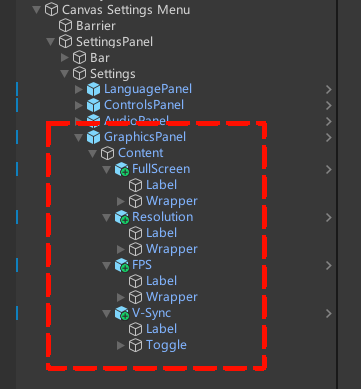
按照上述说法拖入预制体至GraphicsPanel->Content 下,并重命名
处理Label 的翻译
新建脚本GraphicsManager ,挂在在GraphicsPanel 上,具体如下
1 2 3 4 5 6 7 8 9 10 11 12 13 14 15 16 17 18 19 20 21 22 23 24 25 26 27 28 29 30 31 32 33 34 35 36 37 38 39 40 41 42 43 44 45 46 47 48 49 50 51 52 53 54 55 56 57 58 59 60 61 62 63 64 65 66 67 68 69 70 71 72 73 74 75 76 77 78 79 80 81 82 83 84 85 86 87 88 89 90 91 92 93 94 95 96 97 98 99 100 101 102 103 104 105 106 107 108 109 110 111 112 113 114 115 116 117 118 119 120 121 122 123 124 125 126 using UnityEngine;public class GraphicsManager : MonoBehaviour { public static GraphicsManager Instance { get ; private set ; } public Resolution[] SupportedResolutions { get ; private set ; } private void Awake () { if (Instance != null && Instance != this ) { Destroy(gameObject); return ; } Instance = this ; SupportedResolutions = Screen.resolutions; SafeLoadGraphicsSettings(); } private void SafeLoadGraphicsSettings () { Resolution nativeRes = Screen.currentResolution; int defaultWidth = nativeRes.width; int defaultHeight = nativeRes.height; int savedWidth = PlayerPrefs.GetInt("ResWidth" , defaultWidth); int savedHeight = PlayerPrefs.GetInt("ResHeight" , defaultHeight); FullScreenMode savedMode = (FullScreenMode)PlayerPrefs.GetInt("FullScreenMode" , 1 ); int savedTargetFPS = PlayerPrefs.GetInt("TargetFPS" , -1 ); int savedVSync = PlayerPrefs.GetInt("VSync" , 1 ); bool isSupported = false ; foreach (Resolution res in SupportedResolutions) { if (res.width == savedWidth && res.height == savedHeight) { isSupported = true ; break ; } } if (!isSupported) { savedWidth = defaultWidth; savedHeight = defaultHeight; savedMode = FullScreenMode.FullScreenWindow; } RefreshRate bestRefreshRate = GetHighestRefreshRate(savedWidth, savedHeight); Screen.SetResolution(savedWidth, savedHeight, savedMode, bestRefreshRate); Application.targetFrameRate = savedTargetFPS; QualitySettings.vSyncCount = savedVSync; } #region 提供给GraphicsUI调用的用于修改的方法 public void SetAndSaveResolution (int width, int height { RefreshRate bestRefreshRate = GetHighestRefreshRate(width, height); Screen.SetResolution(width, height, Screen.fullScreenMode, bestRefreshRate); PlayerPrefs.SetInt("ResWidth" , width); PlayerPrefs.SetInt("ResHeight" , height); PlayerPrefs.Save(); } public void SetAndSaveFullScreenMode (FullScreenMode mode ) { Screen.fullScreenMode = mode; PlayerPrefs.SetInt("FullScreenMode" , (int )mode); PlayerPrefs.Save(); } public void SetAndSaveTargetFPS (int targetFPS { Application.targetFrameRate = targetFPS; PlayerPrefs.SetInt("TargetFPS" , targetFPS); PlayerPrefs.Save(); } public void SetAndSaveVSync (bool isOn { int vSyncValue = isOn ? 1 : 0 ; QualitySettings.vSyncCount = vSyncValue; PlayerPrefs.SetInt("VSync" , vSyncValue); PlayerPrefs.Save(); } #endregion private RefreshRate GetHighestRefreshRate (int width, int height { RefreshRate highestRate = new RefreshRate() { numerator = 0 , denominator = 1 }; double maxRateValue = 0 ; foreach (Resolution res in SupportedResolutions) { if (res.width == width && res.height == height) { if (res.refreshRateRatio.value > maxRateValue) { maxRateValue = res.refreshRateRatio.value ; highestRate = res.refreshRateRatio; } } } return maxRateValue == 0 ? Screen.currentResolution.refreshRateRatio : highestRate; } }
第三步中处理好保存和加载逻辑,以及提供对外接口,接下来在GraphicsPanel 上挂在新脚本GraphicsUI ,按照如下编写代码
1
2
3
4
5
6
7
8
9
10
11
12
13
14
15
16
17
18
19
20
21
22
23
24
25
26
27
28
29
30
31
32
33
34
35
36
37
38
39
40
41
42
43
44
45
46
47
48
49
50
51
52
53
54
55
56
57
58
59
60
61
62
63
64
65
66
67
68
69
70
71
72
73
74
75
76
77
78
79
80
81
82
83
84
85
86
87
88
89
90
91
92
93
94
95
96
97
98
99
100
101
102
103
104
105
106
107
108
109
110
111
112
113
114
115
116
117
118
119
120
121
122
123
124
125
126
127
128
129
130
131
132
133
134
135
136
137
138
139
140
141
142
143
144
145
146
147
148
149
150
151
152
153
154
155
156
157
158
159
160
161
162
163
164
165
166
167
168
169
170
171
172
173
174
175
176
177
178
179
180
181
182
183
184
185
186
187
188
189
190
191
192
193
194
195
196
197
198
199
200
201
202
203
204
205
206
using System.Collections.Generic;using UnityEngine;using TMPro;using UnityEngine.UI;using UnityEngine.Localization;using UnityEngine.Localization.Settings;public class GraphicsUI : MonoBehaviour { private TMP_Dropdown _fullscreenDropdown; private TMP_Dropdown _resolutionDropdown; private TMP_Dropdown _fpsDropdown; private Toggle _vSyncToggle; private List<Vector2Int> _uniqueResolutions = new List<Vector2Int>(); private readonly string _tableName = "Settings_Menu" ; private readonly int [] _fpsOptions = new int [] { -1 , 360 , 240 , 165 , 144 , 120 , 90 , 75 , 60 , 30 }; private bool _isInitializing = false ; private bool _isLanguageDirty = false ; private void Awake () { Transform contentObj = transform.Find("Content" ); if (contentObj != null ) { _fullscreenDropdown = contentObj.Find("FullScreen/Wrapper/Dropdown" ).GetComponent<TMP_Dropdown>(); _resolutionDropdown = contentObj.Find("Resolution/Wrapper/Dropdown" ).GetComponent<TMP_Dropdown>(); _fpsDropdown = contentObj.Find("FPS/Wrapper/Dropdown" ).GetComponent<TMP_Dropdown>(); _vSyncToggle = contentObj.Find("V-Sync/Toggle" ).GetComponent<Toggle>(); } else { Debug.LogError("[GraphicsUI] 找不到 Content 节点!" ); } } private void Start () { if (_fullscreenDropdown == null ) return ; _isInitializing = true ; InitFullscreenDropdown(); InitResolutionDropdown(); InitFPSDropdown(); InitVSyncToggle(); _isInitializing = false ; LocalizationSettings.SelectedLocaleChanged += OnLocaleChanged; } private void OnDestroy () private void OnLocaleChanged (Locale newLocale )true ; private void OnEnable () { if (_isLanguageDirty && _fullscreenDropdown != null ) { _isInitializing = true ; InitFullscreenDropdown(); InitFPSDropdown(); _isInitializing = false ; _isLanguageDirty = false ; Debug.Log("[GraphicsUI] 发现脏标记,已懒加载重绘 UI!" ); } } private void InitFullscreenDropdown () { _fullscreenDropdown.ClearOptions(); List<string > options = new List<string > { LocalizationSettings.StringDatabase.GetLocalizedString(_tableName, "GraphicsPanel_FullScreen_Dropdown_FS_0" ), LocalizationSettings.StringDatabase.GetLocalizedString(_tableName, "GraphicsPanel_FullScreen_Dropdown_FS_1" ), LocalizationSettings.StringDatabase.GetLocalizedString(_tableName, "GraphicsPanel_FullScreen_Dropdown_FS_2" ) }; _fullscreenDropdown.AddOptions(options); if (Screen.fullScreenMode == FullScreenMode.ExclusiveFullScreen) _fullscreenDropdown.value = 0 ; else if (Screen.fullScreenMode == FullScreenMode.FullScreenWindow) _fullscreenDropdown.value = 1 ; else _fullscreenDropdown.value = 2 ; _fullscreenDropdown.RefreshShownValue(); _resolutionDropdown.interactable = (_fullscreenDropdown.value != 1 ); _fullscreenDropdown.onValueChanged.AddListener(OnFullscreenChanged); } private void OnFullscreenChanged (int dropdownIndex { if (_isInitializing) return ; FullScreenMode mode = FullScreenMode.Windowed; switch (dropdownIndex) { case 0 : mode = FullScreenMode.ExclusiveFullScreen; break ; case 1 : mode = FullScreenMode.FullScreenWindow; break ; case 2 : mode = FullScreenMode.Windowed; break ; } GraphicsManager.Instance.SetAndSaveFullScreenMode(mode); _resolutionDropdown.interactable = (dropdownIndex != 1 ); Debug.Log("OnFullscreenChanged" ); } private void InitResolutionDropdown () { _resolutionDropdown.ClearOptions(); _uniqueResolutions.Clear(); Resolution[] allResolutions = GraphicsManager.Instance.SupportedResolutions; List<string > options = new List<string >(); int currentResIndex = 0 ; for (int i = allResolutions.Length - 1 ; i >= 0 ; i--) { Vector2Int resSize = new Vector2Int(allResolutions[i].width, allResolutions[i].height); if (!_uniqueResolutions.Contains(resSize)) { _uniqueResolutions.Add(resSize); options.Add($"{resSize.x} x {resSize.y} " ); if (resSize.x == Screen.width && resSize.y == Screen.height) { currentResIndex = _uniqueResolutions.Count - 1 ; } } } _resolutionDropdown.AddOptions(options); _resolutionDropdown.value = currentResIndex; _resolutionDropdown.RefreshShownValue(); _resolutionDropdown.onValueChanged.AddListener(OnResolutionChanged); } private void OnResolutionChanged (int resIndex { if (_isInitializing) return ; Vector2Int selectedRes = _uniqueResolutions[resIndex]; GraphicsManager.Instance.SetAndSaveResolution(selectedRes.x, selectedRes.y); } private void InitFPSDropdown () { _fpsDropdown.ClearOptions(); string strUnlimited = LocalizationSettings.StringDatabase.GetLocalizedString(_tableName, "GraphicsPanel_FullScreen_Dropdown_FPS_Unlimited" ); if (string .IsNullOrEmpty(strUnlimited)) { strUnlimited = "无限制" ; Debug.LogWarning($"[GraphicsUI] 找不到本地化键值 'GraphicsPanel_FullScreen_Dropdown_FPS_Unlimited' !请检查 Localization Table。" ); } string fpsFormat = LocalizationSettings.StringDatabase.GetLocalizedString(_tableName, "GraphicsPanel_FullScreen_Dropdown_FPS_0" ); if (string .IsNullOrEmpty(fpsFormat)) { fpsFormat = "{0} FPS" ; Debug.LogWarning($"[GraphicsUI] 找不到本地化键值 'GraphicsPanel_FullScreen_Dropdown_FPS_0' !请检查 Localization Table。" ); } List<string > options = new List<string >(); for (int i = 0 ; i < _fpsOptions.Length; i++) { if (_fpsOptions[i] == -1 ) options.Add(strUnlimited); else options.Add(string .Format(fpsFormat, _fpsOptions[i])); } _fpsDropdown.AddOptions(options); int currentFPS = Application.targetFrameRate; int targetIndex = 0 ; for (int i = 0 ; i < _fpsOptions.Length; i++) { if (currentFPS == _fpsOptions[i]) { targetIndex = i; break ; } } _fpsDropdown.value = targetIndex; _fpsDropdown.RefreshShownValue(); _fpsDropdown.onValueChanged.AddListener(OnFPSChanged); } private void OnFPSChanged (int index { if (_isInitializing) return ; int selectedFPS = _fpsOptions[index]; GraphicsManager.Instance.SetAndSaveTargetFPS(selectedFPS); } private void InitVSyncToggle () { _vSyncToggle.isOn = (QualitySettings.vSyncCount > 0 ); _vSyncToggle.onValueChanged.AddListener(OnVSyncChanged); } private void OnVSyncChanged (bool isOn { if (_isInitializing) return ; GraphicsManager.Instance.SetAndSaveVSync(isOn); } }
我这里最终的结构如图